Instagram pop out effect without Photoshop
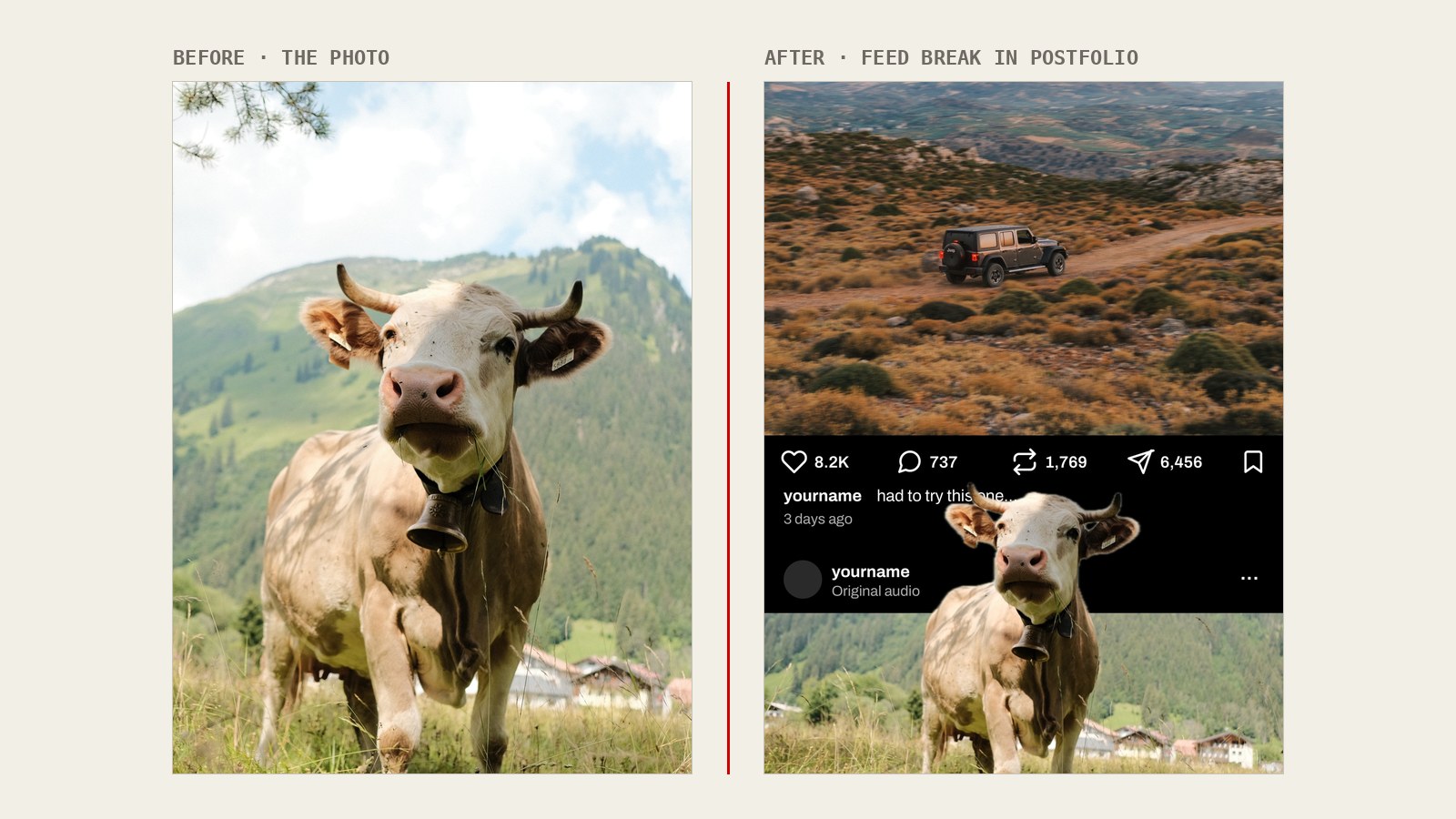
The Instagram pop out effect — also called 3D pop out or out of frame — makes your subject break out of the photo and over the like row, so one post looks like two. You need the subject cut out and layered over the post. In the Postfolio app for iPhone and Android that happens automatically on your phone: no Photoshop, no masking by hand, free and without watermark.
- One tapThe subject is cut out automatically — no masking.
- Looks like two postsLike row and next-post header are built in.
- Dark or lightMatches Instagram's dark and light mode.
- PrivateThe cut-out runs on your phone. No upload, no account.
How the pop out effect works
Instagram shows a post as photo, like row, caption — then the next post starts. The effect copies that layout inside a single slide: the top photo ends, a fake like row follows, then the header of a "next" post. Your subject is cut out and placed on top, so it reaches past the edge of its own photo and over the like row. Someone scrolling sees a subject breaking out of the frame — and only on a second look notices it is all one post.
How to make it in Postfolio
- Open the template. In the Postfolio app open + Add → Templates → Profile → Feed break and choose dark or light, matching how most of your followers see Instagram.
- Fill both slots. Add your photo to the top and bottom slot. The subject is cut out automatically and breaks out over the like row.
- Adjust and export. Double-tap the name, caption or numbers to change them, place the photo with drag and pinch, then export the slide at Instagram's size and post it — on its own or as the first slide of a carousel.
Breaking out of the frame: tips for the photo
- Calm background. Sky, a wall, a studio backdrop — the cleaner the background, the cleaner the edge.
- Head room. Keep the head and shoulders fully in the photo; a subject cut off at the top cannot step out.
- Contrast. Dark subject on light ground or the other way round.
- Movement. A jump, a raised arm, a turned head sells the illusion better than a static pose.
Pop out effect: Photoshop vs Postfolio
| Photoshop | Postfolio app | |
|---|---|---|
| Cut-out | By hand, mask and layers | Automatic, on your phone |
| Like row and next post | Build or download a mock-up | Built in, dark or light |
| Time | Often 15+ minutes | About a minute |
| Price | Subscription | Free, no watermark |
| Device | Computer | iPhone, Android |
In the browser the Feed break template opens the store links, because the automatic cut-out needs the app. Related: Instagram carousels without Photoshop or Canva · Seamless panorama carousels.
Get it on the App StoreGet it on Google Play
Questions, answered straight.
What is the Instagram pop out effect?
Can I make the pop out effect without Photoshop?
Does it work for Stories or only for carousels?
Which photos work best?
Is it free?
Are my photos uploaded?
Try it on your own photos.
The web app is free — no login, no watermark, no time limit. Your photos never leave your device.
iOS and Android: free download, full editor. Pro is a one-time purchase — never a subscription.
Keep reading
- Instagram sizes 2026 — cheat sheet & crop checker
- Seamless panorama carousels, explained
- Split one photo into a 3, 6 or 9 post grid
- A carousel maker without a subscription
- Equal white borders on Instagram photos
- Best Instagram carousel apps in 2026
- Why Postfolio — the fair comparison
- SCRL alternatives — SCRL vs Canva, Unfold, Crsel
- Instagram grid splitter (3, 6, 9 posts)
- Instagram white border tool
- Postfolio vs SCRL
- Postfolio vs Canva
- Postfolio vs Unfold